I evaluate Britain in America as a valid website in teaching my students to select appropriate resources on the web so that they can be more literate in 21st century skills.
Monday, October 5, 2009

Thursday, June 25, 2009
EDUC 6711 Reflection
I took some time this week to reflect on all I have learned throughout this course.
Modified Personal Learning Theory
The concluding sentence of my week one application: “My personal theory of learning is to incorporate the three learning modalities, while promoting my students’ individual intelligences into my daily instruction and use of educational technology.” After this course (and after a week of staff development with John Antonetti), I would modify “incorporate the three learning modalities” by saying applying THE LEARNING CUBE. The Learning Cube incorporates Marzano’s instructional strategies, Schlechty’s qualities of engaging work, and Bloom’s highest levels of cognition (Antonetti, 2005). If I begin to integrate these research based approaches into my classroom, the learning modalities will be addressed as well as multiple intelligences. It will be exciting to experiment with adding the technology component to the Learning Cube!
Immediate Adjustments
I want to emphasize providing feedback and incorporating more nonlinguistic representations. In the past I have provided feedback through the use of personal response devices (Pitler, Hubbell, Kuhn, & Malenoski, 2007, p. 45). I would like to incorporate them more into my daily instruction, not just at the completion of a unit. Personal response devices will provide me with immediate feedback as to the understanding of my lesson. It will also provide students an opportunity to cement (connect) new learning. I currently use a variety of nonlinguistic representations (graphic organizers, kinesthetic activities, and physical models), but I would like to see them transform into more technology based artifacts including: concept maps and multimedia presentations (p. 93, 103).
Long-term Goals for Technology in my Instruction
REINFORCE EFFORT
In order to “enhance my students’ understanding of the relationship between effort and achievement” and “addressing their attitudes and beliefs about learning” I want to utilize spreadsheet software (p. 155, 156). It will be a powerful learning experience for my students “to chart the relationship between effort and achievement (p. 156). They will have a visual representation of their efforts and the result of those efforts. By creating an Effort Rubric and setup an effort/achievement spreadsheet, I will supply my students with the tools they need to witness amount of effort = amount of achievement. In time, “they will work harder and in specific ways” because of the effort rubric and the proven results of those efforts (p. 160).
COOPERATIVE LEARNING
Atonetti’s Learning Cube refers to cooperative learning as “learning with others”, and the explanation includes the word interdependently (Schlechty, 2002). Most of the time, cooperative learning is misused and misunderstood. Teachers plan/assign group work without the focus of learning from each other as well as working together. My goal would be to include Cooperative Learning in an effective way – students not just talking to each other, but also ¬listening and paraphrasing each other’s thoughts. This can be where real learning from each other can take place. I would like to use VoiceThreads as apart of integrating technology into cooperative learning. In the beginning, I would create VoiceThreads for students to see a model, as well as begin to practice commenting on videos. It will move into creating VoiceThreads with their small groups and groups commenting on threads. Eventually individual students will be able to create and comment on peers’ VoiceThreads as a way to learn from each other. Depending on the accessibility/privacy settings, family, friends, and strangers from around the world would be able to comment on students’ videos – creating an amazing example of extreme cooperative learning!
The past eight weeks have been an amazing experience! I have a greater understanding of Marzano’s strategies, as well as how technology can be used to incorporate those techniques into my classroom. I am looking forward to this upcoming year and future Walden courses.
Antonetti, J. (2005).
Pitler, H., Hubbell, E., Kuhn, M., & Malenoski, K. (2007). Using technology with classroom instruction that works. Alexandria, VA: ASCD.
Schlechty, P. (2002) Working on the Work. San Francisco, CA: Jossey-Bass.
Modified Personal Learning Theory
The concluding sentence of my week one application: “My personal theory of learning is to incorporate the three learning modalities, while promoting my students’ individual intelligences into my daily instruction and use of educational technology.” After this course (and after a week of staff development with John Antonetti), I would modify “incorporate the three learning modalities” by saying applying THE LEARNING CUBE. The Learning Cube incorporates Marzano’s instructional strategies, Schlechty’s qualities of engaging work, and Bloom’s highest levels of cognition (Antonetti, 2005). If I begin to integrate these research based approaches into my classroom, the learning modalities will be addressed as well as multiple intelligences. It will be exciting to experiment with adding the technology component to the Learning Cube!
Immediate Adjustments
I want to emphasize providing feedback and incorporating more nonlinguistic representations. In the past I have provided feedback through the use of personal response devices (Pitler, Hubbell, Kuhn, & Malenoski, 2007, p. 45). I would like to incorporate them more into my daily instruction, not just at the completion of a unit. Personal response devices will provide me with immediate feedback as to the understanding of my lesson. It will also provide students an opportunity to cement (connect) new learning. I currently use a variety of nonlinguistic representations (graphic organizers, kinesthetic activities, and physical models), but I would like to see them transform into more technology based artifacts including: concept maps and multimedia presentations (p. 93, 103).
Long-term Goals for Technology in my Instruction
REINFORCE EFFORT
In order to “enhance my students’ understanding of the relationship between effort and achievement” and “addressing their attitudes and beliefs about learning” I want to utilize spreadsheet software (p. 155, 156). It will be a powerful learning experience for my students “to chart the relationship between effort and achievement (p. 156). They will have a visual representation of their efforts and the result of those efforts. By creating an Effort Rubric and setup an effort/achievement spreadsheet, I will supply my students with the tools they need to witness amount of effort = amount of achievement. In time, “they will work harder and in specific ways” because of the effort rubric and the proven results of those efforts (p. 160).
COOPERATIVE LEARNING
Atonetti’s Learning Cube refers to cooperative learning as “learning with others”, and the explanation includes the word interdependently (Schlechty, 2002). Most of the time, cooperative learning is misused and misunderstood. Teachers plan/assign group work without the focus of learning from each other as well as working together. My goal would be to include Cooperative Learning in an effective way – students not just talking to each other, but also ¬listening and paraphrasing each other’s thoughts. This can be where real learning from each other can take place. I would like to use VoiceThreads as apart of integrating technology into cooperative learning. In the beginning, I would create VoiceThreads for students to see a model, as well as begin to practice commenting on videos. It will move into creating VoiceThreads with their small groups and groups commenting on threads. Eventually individual students will be able to create and comment on peers’ VoiceThreads as a way to learn from each other. Depending on the accessibility/privacy settings, family, friends, and strangers from around the world would be able to comment on students’ videos – creating an amazing example of extreme cooperative learning!
The past eight weeks have been an amazing experience! I have a greater understanding of Marzano’s strategies, as well as how technology can be used to incorporate those techniques into my classroom. I am looking forward to this upcoming year and future Walden courses.
Antonetti, J. (2005).
Pitler, H., Hubbell, E., Kuhn, M., & Malenoski, K. (2007). Using technology with classroom instruction that works. Alexandria, VA: ASCD.
Schlechty, P. (2002) Working on the Work. San Francisco, CA: Jossey-Bass.
Thursday, June 4, 2009
My FIRST VoiceThread!
This is a very exciting opportunity. I have yet to realize it's full potential for my classroom, but I know the possibilities are endless!

Click here to listen to my VOICETHREAD on Bullying.

Click here to listen to my VOICETHREAD on Bullying.
Tuesday, June 2, 2009
Connectivism and Social Learning in Practice (APP5)
I often hear teachers complaining, "My students talk too much!" or "What a chatty bunch!" or "They won't shut-up!" If they would accept the theory of social learning, they would have the ideal class. However, I cannot attempt to say this better than the original theorist has already so eloquently put into words:
One of the basic assumptions of Bandura's Social Learning Theory or Social Constructivism is, "MEANINGFUL learning occurs when individuals are engaged in social activities". What better place than school for students to experience BOTH meaningful learning and social activities? School is a primary source of students' social interactions.
Once teachers embrace social learning, there are instructional strategies and technologies that they can use to combine learning and socializing. Here are just a few that are listed in this week's resources:
 Not only was I able to communicate with my students, but they were also communicating with each other. I just created ePals accounts for my students the last quarter of this school year, so they were my guinea pigs. I set very few requirements about what their emails included, so they were very informal and friendly. I did show them how to store files, so they have their writing pieces from this year to carry on to middle school. Epals also provides discussion forums, projects, and worldwide penpals. Epals is totally safe and allows for the moderator to preview and accept/decline each email message. I am excited for how I can use email next year to encourage more writing with my students.
 Blogs are effective communication tools that allow students to post, read, and discuss a wide variety of topics and/or issues. I "tested" blogs with this year's students as well. Instead of a lengthy post that they would not enjoy reading, I asked simple review questions. The experience was pleasant for all, and I am excited about the potential for blogs with group collaboration within content areas.
 del.icio.us.com is social bookmarking site that can be used to facilitate collaboration. It allows users to create a list of websites and saves them in one location. Pitler, Hubbell, Kuhn, & Malenoski(2007) referred to the amount of time teachers wasted by creating favorite lists on each classroom computer. With del.icio.us.com, teachers will save time by allowing their students to access the premade list. It could also be used amoung students who are working on a project. If they are working away from school, this website would provide access to their favorited list of websites from anywhere.
These are just a few of the webtools that can be used to facilitate collaboration among students. It is just one way that teachers can redirect and engage their chatty students! How great would it be to hear students discussing a blog or a new website from their bookmarking site?!
"Learning would be exceedingly laborious, not to mention hazardous, if people had to rely solely on the effects of their own actions to inform them what to do. Fortunately, most human behavior is learned observationally through modeling: from observing others one forms an idea of how new behaviors are performed, and on later occasions this coded information serves as a guide for action."
-Albert Bandura, Social Learning Theory, 1977
One of the basic assumptions of Bandura's Social Learning Theory or Social Constructivism is, "MEANINGFUL learning occurs when individuals are engaged in social activities". What better place than school for students to experience BOTH meaningful learning and social activities? School is a primary source of students' social interactions.
Once teachers embrace social learning, there are instructional strategies and technologies that they can use to combine learning and socializing. Here are just a few that are listed in this week's resources:
 Not only was I able to communicate with my students, but they were also communicating with each other. I just created ePals accounts for my students the last quarter of this school year, so they were my guinea pigs. I set very few requirements about what their emails included, so they were very informal and friendly. I did show them how to store files, so they have their writing pieces from this year to carry on to middle school. Epals also provides discussion forums, projects, and worldwide penpals. Epals is totally safe and allows for the moderator to preview and accept/decline each email message. I am excited for how I can use email next year to encourage more writing with my students.
 Blogs are effective communication tools that allow students to post, read, and discuss a wide variety of topics and/or issues. I "tested" blogs with this year's students as well. Instead of a lengthy post that they would not enjoy reading, I asked simple review questions. The experience was pleasant for all, and I am excited about the potential for blogs with group collaboration within content areas.
  del.icio.us.com is social bookmarking site that can be used to facilitate collaboration. It allows users to create a list of websites and saves them in one location. Pitler, Hubbell, Kuhn, & Malenoski(2007) referred to the amount of time teachers wasted by creating favorite lists on each classroom computer. With del.icio.us.com, teachers will save time by allowing their students to access the premade list. It could also be used amoung students who are working on a project. If they are working away from school, this website would provide access to their favorited list of websites from anywhere.
These are just a few of the webtools that can be used to facilitate collaboration among students. It is just one way that teachers can redirect and engage their chatty students! How great would it be to hear students discussing a blog or a new website from their bookmarking site?!
Wednesday, May 27, 2009
Constructivism in Practice (APP4)
Project-based Learning and Learning by Design approaches excite me because of the positive impact they have on learning: collaboration, high motivation, learner-centered environment, etc. (Han & Bhattacharya, 2001). My students and I have enjoyed these opportunities as they occurred throughout the school year.
However, these types of lessons/projects cause me tension. I'm not sure if it's because I have to give up 'power' (the transition from instructor to facilitator) or the unknown of allowing my students freedom. Han & Bhattacharya (2001) concur that "instructors should also encourage learners to find answers independently from resources rather than simply 'feeding' them information." The benefits outweigh the challenges, but as with anything new, those are difficult to overcome.
The following reasons should be the encouragement I need:
* Increased motivation
* Increased problem-solving ability
* Improved media research skills
* Increased collaboration
* Increase resource management skills
(Han & Bhattacharya, 2001).
I hope that with this course and the resources I have read so far, I will take on the new challenge of planning more constructivist lessons. This week use your comments to offer advice or tips to get me going! THANKS!
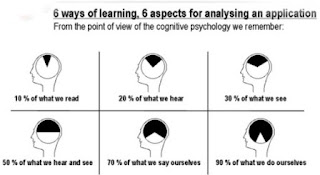
As if I need more encouragement, I found this visual (I live for dual-coding!)
Han, S., and Bhattacharya, K. (2001). Constructionism, Learning by Design, and Project Based Learning. In M. Orey (Ed.), Emerging perspectives on learning, teaching, and technology. Retrieved May 27, 2009, from http://projects.coe.uga.edu/epltt.
However, these types of lessons/projects cause me tension. I'm not sure if it's because I have to give up 'power' (the transition from instructor to facilitator) or the unknown of allowing my students freedom. Han & Bhattacharya (2001) concur that "instructors should also encourage learners to find answers independently from resources rather than simply 'feeding' them information." The benefits outweigh the challenges, but as with anything new, those are difficult to overcome.
The following reasons should be the encouragement I need:
* Increased motivation
* Increased problem-solving ability
* Improved media research skills
* Increased collaboration
* Increase resource management skills
(Han & Bhattacharya, 2001).
I hope that with this course and the resources I have read so far, I will take on the new challenge of planning more constructivist lessons. This week use your comments to offer advice or tips to get me going! THANKS!
As if I need more encouragement, I found this visual (I live for dual-coding!)

Han, S., and Bhattacharya, K. (2001). Constructionism, Learning by Design, and Project Based Learning. In M. Orey (Ed.), Emerging perspectives on learning, teaching, and technology. Retrieved May 27, 2009, from http://projects.coe.uga.edu/epltt.
Tuesday, May 19, 2009
Cognitivism in Practice (APP3)
This week's introduction said it best: "Cognitive theory views learning as the process of organizing new information into existing understandings." We can help our students "develop an awareness of how they think in order to improve understanding. Technology provides us with new ways to incorporate cognitive strategies into instruction and learning."
This week's instructional strategies "Cues, Questions, and Advance Organizers" and "Summarizing and Note taking" work particularly well in light of the cognitive learning theory. Cues, Questions, and Advance Organizers have specific tasks when we want to "enhance students' ability" (Pitler, Hubbell, Kuhn,& Malenoski,2007).

CUES: "Reminders or hints"
This allows for students to have their network connections ready to go. Cues spark student memory. Dr. Wolfe defines memory as "the ability to reactivate a connection" (Laureate Education, Inc., 2009). Teachers can use the Internet to facilitate cues by easy access to visuals (pictures, videos, etc.).
 QUESTIONS: "trigger students' memories"; "access prior knowledge"
Developing an essential question not only sparks a memory, but it also provides a focus for the learning. This focus is a way to organize student thinking.
 Cues and Questions pave the way for Advance Organizers. Once you can get your students wheels turning through cues and questions, they are ready to organize their prior knowledge. This is where MOST of the technology tools come into play.
Here are just five ways you can use technology and ADVANCE ORGANIZERS.
1. POWERPOINT supports dual-coding (images AND text). Since the information is stored in at least two ways, it is more likely to make a stronger connection in the brain.
2. EXCEL spreadsheets allow for students to manage vast amounts of data/numbers easily.
3. CONCEPT MAPPING replicates the brain's network model for long-term memory. Also, it is possible to convert into an outline.
4. VIRTUAL FIELD TRIPS gives students the "opportunity to compare information with other primary sources" (Laureate Education, Inc. 2009b). It also allows the brain to create an episodic memory. As you "go" on these trips, use a concept map to guide your students' thinking.
5. MULTIMEDIA has a two-fold purpose for students: "activate prior knowledge and develop a mental model to help them understand new knowledge" (Pitler, et al., 2007, p. 82).
With so many ways to reactivate, build, bridge, and implant connections of learning in our students' brains, teachers should have no trouble "teaching MORE in LESS time because we are teaching it better!" (Laureate Education, Inc., 2009a).

REFERENCES:
Laureate Education, Inc. (Executive Producer). (2009a). Program One. Understanding the Brain [Motion Picture]. Bridging learning theory, instruction, and technology. Baltimore: Author.
Laureate Education, Inc. (Executive Producer). (2009b). Program Six. Spotlight on Technology: Virtual Field Trips [Motion Picture]. Bridging learning theory, instruction, and technology. Baltimore: Author.
Pitler, H., Hubbell, E., Kuhn, M., & Malenoski, K. (2007). Using technology with classroom instruction that works. Alexandria, VA: ASCD.
This week's instructional strategies "Cues, Questions, and Advance Organizers" and "Summarizing and Note taking" work particularly well in light of the cognitive learning theory. Cues, Questions, and Advance Organizers have specific tasks when we want to "enhance students' ability" (Pitler, Hubbell, Kuhn,& Malenoski,2007).

CUES: "Reminders or hints"
This allows for students to have their network connections ready to go. Cues spark student memory. Dr. Wolfe defines memory as "the ability to reactivate a connection" (Laureate Education, Inc., 2009). Teachers can use the Internet to facilitate cues by easy access to visuals (pictures, videos, etc.).
 QUESTIONS: "trigger students' memories"; "access prior knowledge"
Developing an essential question not only sparks a memory, but it also provides a focus for the learning. This focus is a way to organize student thinking.
 Cues and Questions pave the way for Advance Organizers. Once you can get your students wheels turning through cues and questions, they are ready to organize their prior knowledge. This is where MOST of the technology tools come into play.
 Here are just five ways you can use technology and ADVANCE ORGANIZERS.
1. POWERPOINT supports dual-coding (images AND text). Since the information is stored in at least two ways, it is more likely to make a stronger connection in the brain.
2. EXCEL spreadsheets allow for students to manage vast amounts of data/numbers easily.
3. CONCEPT MAPPING replicates the brain's network model for long-term memory. Also, it is possible to convert into an outline.
4. VIRTUAL FIELD TRIPS gives students the "opportunity to compare information with other primary sources" (Laureate Education, Inc. 2009b). It also allows the brain to create an episodic memory. As you "go" on these trips, use a concept map to guide your students' thinking.
5. MULTIMEDIA has a two-fold purpose for students: "activate prior knowledge and develop a mental model to help them understand new knowledge" (Pitler, et al., 2007, p. 82).
With so many ways to reactivate, build, bridge, and implant connections of learning in our students' brains, teachers should have no trouble "teaching MORE in LESS time because we are teaching it better!" (Laureate Education, Inc., 2009a).

REFERENCES:
Laureate Education, Inc. (Executive Producer). (2009a). Program One. Understanding the Brain [Motion Picture]. Bridging learning theory, instruction, and technology. Baltimore: Author.
Laureate Education, Inc. (Executive Producer). (2009b). Program Six. Spotlight on Technology: Virtual Field Trips [Motion Picture]. Bridging learning theory, instruction, and technology. Baltimore: Author.
Pitler, H., Hubbell, E., Kuhn, M., & Malenoski, K. (2007). Using technology with classroom instruction that works. Alexandria, VA: ASCD.
Wednesday, May 13, 2009
Behaviorism in Practice
It's that time of year - State Standardized Assessments! I used much of my review time over the last week and a half to include behaviorist strategies and technology.
My school purchased Interwrite's Personal Response System (PRS) "clickers". They are similar to a remote control and the PRS program allows for multiple-choice questions to be inserted. Once the students type in their response, I get immediate feedback of their understanding - a bar graph pops up! It shows how many students chose the correct and incorrect answer. It is a great tool for informal assessment, reviews, etc. as well as keeping my students engaged in the lesson or activity. After some trouble with behavior, I included an extra incentive: for every 5 questions correct, they would receive ONE Skittle. This is behaviorism at work! Standridge (2002) defined positive reinforcement as "something is added to increase desired behavior". By offering a skittle reward, I encouraged my students to show their best work to prove their knowledge.
The drill and practice of behaviorism can also be accomplished through technology. Even with songs, poems, tricks, etc., there is no substitute for automaticity of math facts. One way I use technology to encourage fact recall speed is my SMARTboard and "Hit the Button". During Team Time (a 45 minute block of targeted math instruction), my students challenge each other to see how many problems they can 'hit' in one minute. Their scored definitely increased each time. Not only were they challenging each other, but I could also see the internal motivation from improving their score. I would like to incorporate graphing their results into next year's challenge! The graph would be a great way to "reinforce effort" (Pitler, Hubbell, Kuhn, and Malenoski, 2007). Were my students taking extra time to master the facts? If so, their efforts would be visible on their graphs.
I agree with Dr. Orey that technology should rarely be used for remediation (Laureate Education, 2009). Instead it should be used as guided or independent practice for a developing skill, in which the technology can help lead the student to mastery. This applies to a program my district subscribes to Larson's Math, which Dr. Orey would classify as Programmed Instruction or an online tutorial. Students have their own account that tracks their progress for the major math skills: +, -, *, / whole numbers, decimals, fractions, geometry, etc. Students complete levels and they are able to print certificates. Sometimes I assign Larson's as an early finishers' assignment, but it is also great to take my whole class to the computer lab for independent practice. I can use this time to tutor small groups or individuals struggling with certain skills.
I look forward to hearing your thoughts! Jenelle
Laureate Education, Inc. (Executive Producer). (2009). Program Four. Behaviorist Learning Theory [Motion Picture]. Bridging learning theory, instruction, and technology. Baltimore: Author.
Pitler, H., Hubbell, E., Kuhn, M., & Malenoski, K. (2007). Using technology with classroom instruction that works. Alexandria, VA: ASCD.
Standridge, M.. (2002). Behaviorism. In M. Orey (Ed.), Emerging perspectives on learning, teaching, and technology. Retrieved May 13, 2009, from http://projects.coe.uga.edu/epltt/
My school purchased Interwrite's Personal Response System (PRS) "clickers". They are similar to a remote control and the PRS program allows for multiple-choice questions to be inserted. Once the students type in their response, I get immediate feedback of their understanding - a bar graph pops up! It shows how many students chose the correct and incorrect answer. It is a great tool for informal assessment, reviews, etc. as well as keeping my students engaged in the lesson or activity. After some trouble with behavior, I included an extra incentive: for every 5 questions correct, they would receive ONE Skittle. This is behaviorism at work! Standridge (2002) defined positive reinforcement as "something is added to increase desired behavior". By offering a skittle reward, I encouraged my students to show their best work to prove their knowledge.
The drill and practice of behaviorism can also be accomplished through technology. Even with songs, poems, tricks, etc., there is no substitute for automaticity of math facts. One way I use technology to encourage fact recall speed is my SMARTboard and "Hit the Button". During Team Time (a 45 minute block of targeted math instruction), my students challenge each other to see how many problems they can 'hit' in one minute. Their scored definitely increased each time. Not only were they challenging each other, but I could also see the internal motivation from improving their score. I would like to incorporate graphing their results into next year's challenge! The graph would be a great way to "reinforce effort" (Pitler, Hubbell, Kuhn, and Malenoski, 2007). Were my students taking extra time to master the facts? If so, their efforts would be visible on their graphs.
I agree with Dr. Orey that technology should rarely be used for remediation (Laureate Education, 2009). Instead it should be used as guided or independent practice for a developing skill, in which the technology can help lead the student to mastery. This applies to a program my district subscribes to Larson's Math, which Dr. Orey would classify as Programmed Instruction or an online tutorial. Students have their own account that tracks their progress for the major math skills: +, -, *, / whole numbers, decimals, fractions, geometry, etc. Students complete levels and they are able to print certificates. Sometimes I assign Larson's as an early finishers' assignment, but it is also great to take my whole class to the computer lab for independent practice. I can use this time to tutor small groups or individuals struggling with certain skills.
I look forward to hearing your thoughts! Jenelle
Laureate Education, Inc. (Executive Producer). (2009). Program Four. Behaviorist Learning Theory [Motion Picture]. Bridging learning theory, instruction, and technology. Baltimore: Author.
Pitler, H., Hubbell, E., Kuhn, M., & Malenoski, K. (2007). Using technology with classroom instruction that works. Alexandria, VA: ASCD.
Standridge, M.. (2002). Behaviorism. In M. Orey (Ed.), Emerging perspectives on learning, teaching, and technology. Retrieved May 13, 2009, from http://projects.coe.uga.edu/epltt/
Tuesday, April 28, 2009
Science Review
Click on the link below to view ALL Science Essential Questions.
Essential Questions
Choose TWO questions to 'quiz' your classmates.
Good Luck!
Miss Crocker
Essential Questions
Choose TWO questions to 'quiz' your classmates.
Good Luck!
Miss Crocker
Cold War
Ask your classmates a question that pertains to the COLD WAR. Think about what we need to know for our test today! This will help them study.
#1: What IS the Cold War?
Good luck! Miss Crocker
#1: What IS the Cold War?
Good luck! Miss Crocker
Sunday, March 1, 2009
EDUC 6710 Reflective Essay
I am not sure where to start about all I have learned from taking this course (EDUC 6710 – Understanding the Impact of Technology on Education, Work, and Society). I have developed technology skills that have already begun to influence my professional and personal life. As a “digital native” (a term coined by Mark Prensky, 2001), I have read and written blogs on social networking sites, subscribed to podcasts on iTunes, and used Wikipedia for research. However, in some ways I am still a “digital immigrant” when it comes to my classroom. This course brought technological tools to the forefront on my mind in regards to my students.
Now that I know how to create and integrate blogs, podcasts, and wikis, I am excited about the potential for my students to take more control of their school day by learning through experience as they construct new knowledge (Jonassen et al., 1999, as cited in Keengwe, Onchwari, & Wachira, 2008). Reil and Becker (2000) pointed out, “classrooms that authentically use technology should experience changes in teacher’s roles, learner’s roles, the process of learning, and assessment” (Keengwe et al., 2008). My role will begin to change from the source of all knowledge to “coach”, “collaborator”, “content creator”, “connector” which will lead to change in my classroom, school, and quite possibly my district (Richardson, 2009).
My new focus has been allowing my students to use the technology. Sure, I can stand up at the SMARTboard and click away, but how is that using it to its full potential? As rising middle-schoolers, my fifth graders would benefit greatly from the 21st century skills developed through creation of blogs, podcasts, and wikis: computing, collaborating, creativity, and critical-thinking (Trilling, 2005). I hope to continue to change from ‘doing things differently’ to ‘doing different things’ with technology.
I will expand my use of technology by continuing to integrate more technology opportunities for my students to use, create, present, and share. This will increase student learning because “the true prerequisites for learning [are] engagement and motivation” (Prensky, 2005). My students will be using internet tools to create ongoing projects that they will be able to present to peers, then share their ideas/solutions with the world. I plan to make wikis and blogs a normal part of our vocabulary when beginning a new unit of study. I also want my students to create/manage a webpage that can serve as a communication tool with me, other teachers, each other, their parents, and the community. There is more for me to learn in order to teach and lead with my class toward greater learning.
With all I have learned, there is opportunity to get overwhelmed. However, I believe that if I set a few reasonable goals, the challenge will not seem so daunting. First of all, I am setting a goal of planning for my students to spend at least 4 hours a week on the computer working toward a learning goal. Learning goals can be accomplished, but will not be limited to the following: standards based wikis, discussion blogs, research presentations, homework assignments, etc. They can spend this computer/technology time on a classroom computer, in the school lab, or at home. My second goal is a technology integration practice from the initial course checklist: “design learning experiences that require students to formulate questions for inquiry and engage in real-world problem-solving activities” (Assessment Checklist, 2009). Though I know thousands of webquests exist with just a simple google search, designing inquiry activities is something that will challenge me to become a better content creator, connector, and coach.
This is my last blog post as an assignment for EDUC 6710. The next blog posts you see will include my students. This course has certainly helped me understand the impact of technology on education, society, and work. Technology DOES impact
1) My Education: I am going to receive my master’s degree through an online university.
2) My place in society: I connect with old and new friends through social networking and this blog.
3) My work: I am coaching my students to apply technologies in these three areas of their lives.
Jenelle
Keengwe, J., Onchwari, G., & Wachira, P. (2008). The use of computer tools to support meaningful learning. AACE Journal, 16(1), 77–92
Prensky, M. (2005). Listen to the natives. Educational Leadership, 63(4), 8–13.
Prensky, M. (2001). Digital natives, digital immigrants. On the Horizon, 9(5).
Trilling, B. (2005). Towards learning societies and the global challenges for learning with ICT. TechForum. Retrieved from http://www.techlearning.com/techlearning/pdf/events/techforum/ny05/Toward_Learning_Societies.pdf
Now that I know how to create and integrate blogs, podcasts, and wikis, I am excited about the potential for my students to take more control of their school day by learning through experience as they construct new knowledge (Jonassen et al., 1999, as cited in Keengwe, Onchwari, & Wachira, 2008). Reil and Becker (2000) pointed out, “classrooms that authentically use technology should experience changes in teacher’s roles, learner’s roles, the process of learning, and assessment” (Keengwe et al., 2008). My role will begin to change from the source of all knowledge to “coach”, “collaborator”, “content creator”, “connector” which will lead to change in my classroom, school, and quite possibly my district (Richardson, 2009).
My new focus has been allowing my students to use the technology. Sure, I can stand up at the SMARTboard and click away, but how is that using it to its full potential? As rising middle-schoolers, my fifth graders would benefit greatly from the 21st century skills developed through creation of blogs, podcasts, and wikis: computing, collaborating, creativity, and critical-thinking (Trilling, 2005). I hope to continue to change from ‘doing things differently’ to ‘doing different things’ with technology.
I will expand my use of technology by continuing to integrate more technology opportunities for my students to use, create, present, and share. This will increase student learning because “the true prerequisites for learning [are] engagement and motivation” (Prensky, 2005). My students will be using internet tools to create ongoing projects that they will be able to present to peers, then share their ideas/solutions with the world. I plan to make wikis and blogs a normal part of our vocabulary when beginning a new unit of study. I also want my students to create/manage a webpage that can serve as a communication tool with me, other teachers, each other, their parents, and the community. There is more for me to learn in order to teach and lead with my class toward greater learning.
With all I have learned, there is opportunity to get overwhelmed. However, I believe that if I set a few reasonable goals, the challenge will not seem so daunting. First of all, I am setting a goal of planning for my students to spend at least 4 hours a week on the computer working toward a learning goal. Learning goals can be accomplished, but will not be limited to the following: standards based wikis, discussion blogs, research presentations, homework assignments, etc. They can spend this computer/technology time on a classroom computer, in the school lab, or at home. My second goal is a technology integration practice from the initial course checklist: “design learning experiences that require students to formulate questions for inquiry and engage in real-world problem-solving activities” (Assessment Checklist, 2009). Though I know thousands of webquests exist with just a simple google search, designing inquiry activities is something that will challenge me to become a better content creator, connector, and coach.
This is my last blog post as an assignment for EDUC 6710. The next blog posts you see will include my students. This course has certainly helped me understand the impact of technology on education, society, and work. Technology DOES impact
1) My Education: I am going to receive my master’s degree through an online university.
2) My place in society: I connect with old and new friends through social networking and this blog.
3) My work: I am coaching my students to apply technologies in these three areas of their lives.
Jenelle
Keengwe, J., Onchwari, G., & Wachira, P. (2008). The use of computer tools to support meaningful learning. AACE Journal, 16(1), 77–92
Prensky, M. (2005). Listen to the natives. Educational Leadership, 63(4), 8–13.
Prensky, M. (2001). Digital natives, digital immigrants. On the Horizon, 9(5).
Trilling, B. (2005). Towards learning societies and the global challenges for learning with ICT. TechForum. Retrieved from http://www.techlearning.com/techlearning/pdf/events/techforum/ny05/Toward_Learning_Societies.pdf
Subscribe to:
Posts (Atom)